When I first joined Microsoft, I was doing a lot with JavaScript and hacking around a bit with IoT. Because of this, one of my colleagues sent me a box of Tessel 2 boards and sensors they had lying around. I had never heard of Tessel before, but I was intrigued by the idea of a microcontroller that could be programmed in JavaScript (I’d dabbled a bit with that using NodeMCU in the past). I didn’t have any direct ideas on what to do with them, but I figured I’d play around with them and see what I could build.
Unfortunately, this was in 2019 and Tessel had already gone quiet by then. The boards were still functional, but were really designed to be used from Linux and macOS, and I was on Windows. I didn’t have the time to get them working, so they ended up in a drawer, becoming glorified eWaste.
What a Tessel 2 actually was
If you’ve not heard of Tessel before, well, I’m not really surprised as they are now relegated to the annals of IoT history. Tessel was an OSS hardware project that shipped two generations of boards, I never used the Tessel 1, I only got these Tessel 2 devices.
The pitch of them was that they ran Node.js on the board, meaning you have a lot of potential in the kind of things you could build with it. These boards have two USB ports, wifi, Ethernet, and two module ports with 8 I/O pins each that can be used for GPIO, SPI, UART, I2C, and ADC at 3.3v logic, along with a separate header that can supply 5v to whatever you’ve wired up. The processor on the board is a MediaTek MT7620n (MIPS32, ~580MHz) running Linux (which I learnt about later and we’ll cover in a future post) and an Atmel SAMD21 (ARM Cortex-M0+) coprocessor that owns the two module ports and the USB connection. They talk to each other over SPI.
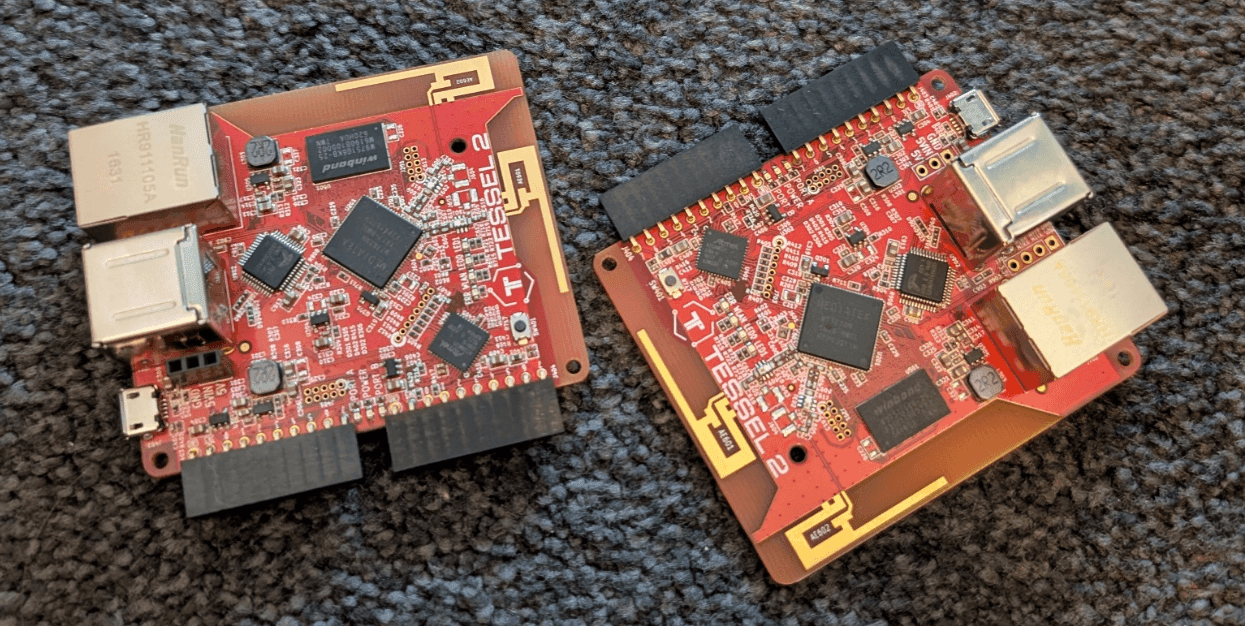
But it turns out that running an OSS hardware project is hard and Tessel went quiet in the late 2010s, and the boards were left in a state where they were still functional, but the software supply chain had rotted. And this is where we come in today.
Why they stayed in the drawer
While the project went quiet nearly a decade ago, these boards were still essentially functional. Every now and then my kids would rediscover them in the drawer and ask if they could play with them, I’d plug them into my machine and we’d see what we can do but it was never successful. After all, the toolchain never was designed to work on Windows - when the project kicked off it was around the Node.js 4 era and while that worked on Windows, it didn’t really work on Windows. Combine that with native modules that you needed to talk to the board over USB, the website being offline, and the feeds used to flash the board being long gone, and it was a recipe for frustration.
It was disappointing, the hardware has a lot of potential. But none of that was the hardware’s fault - every one of those dead ends was a website, a package feed, or a runtime that had rotted out from under a board that still booted perfectly fine. The boards weren’t broken, everything around them was, and that’s what made them a bit of a white elephant.
Hello the modern world
After the most recent “dad, can you make this work” moment with my kids, I decided to take a look at the boards again to see if I could figure out some way to get them working. Given that the past few years of my work has been focused around AI, specifically GitHub Copilot, I got an idea - could I use AI to help me get these boards working again? While Tessel themselves might no longer be active, being an OSS project everything is on their GitHub organisation, and with the right digging you can find everything from the hardware schematics to the firmware and the toolchain for making it all work. Worst-case scenario, I’d have a drawer full of dead boards, which is essentially what I have anyway, so is there really anything to lose?
What this series is
To cut a long story short - the boards are working, I can use them via Windows using modern Node.js, they are updated to the latest OpenWrt release with the latest Linux kernel, and a Node.js runtime that is slightly newer than the one they shipped with (the CPU architecture is a bit old now, so the latest Node.js doesn’t run on it). I can deploy code to them from inside an AI coding tool, through a canvas extension in the GitHub Copilot app.
But this series is not about the end result, it’s how I got there. I want to take a look at the process that I went through, the mistakes made, and most importantly, the role that AI played in getting these boards working again. This series will go deep into the technical details, including kernel configurations, flash layouts, SPI drivers, and more. It will also cover the wrong turns taken along the way, as those are often the most valuable learning experiences.
The real success story here is AI. I’m not a kernel developer, heck, I hardly remember how to write C or C++ anymore (uni was a looooong time ago!), so I knew that hand-porting an embedded Linux distro across ten years of releases in my spare time was not going to happen. I know that there are plenty of people out there who are very skeptical of AI in general, not just for software development, so I wanted to show how it can be used to solve a real-world problem, and in this case, it was the only way I could get these boards working again.
Up next
Next time we go looking for what’s actually on these boards. I mentioned they run Linux - I didn’t know that when I started. The information isn’t gone, either: the GitHub org is still up, some of the docs sites still resolve, and between them is more or less everything you’d need. It’s just spread across a pile of repos, a decade stale in places, and none of it written for someone turning up in 2026 holding a board and wondering where to start.