Dependabot is one of those tools that I really appreciate, right up until I open a repository and see a pile of pull requests waiting for me. And this is particularly noticeable when working on a monorepo, such as the Aspire Community Toolkit.
Individually, each PR is pretty simple: a dependency moves from one version to another, the lockfile changes, CI runs, and if all is well you merge it. The problem is that they don’t arrive individually. They arrive as a queue, and that queue has relationships that GitHub’s PR list doesn’t really make obvious. Which PRs fix security alerts? Which ones touch the same lockfile and will conflict with each other once I merge the first one? Are there alerts with no PR fixing them at all?
I found myself doing that analysis in my head (or across a bunch of browser tabs) whenever I sat down to tidy up dependencies. So I built a canvas for the Copilot app to help: the Dependabot Triage Canvas.
Looking at the queue differently
Canvases are apps that you host in a session within the Copilot app that let you work with something other than chat - a kanban board, an external system dashboard, or in this case, a purpose-built view of your Dependabot PRs.
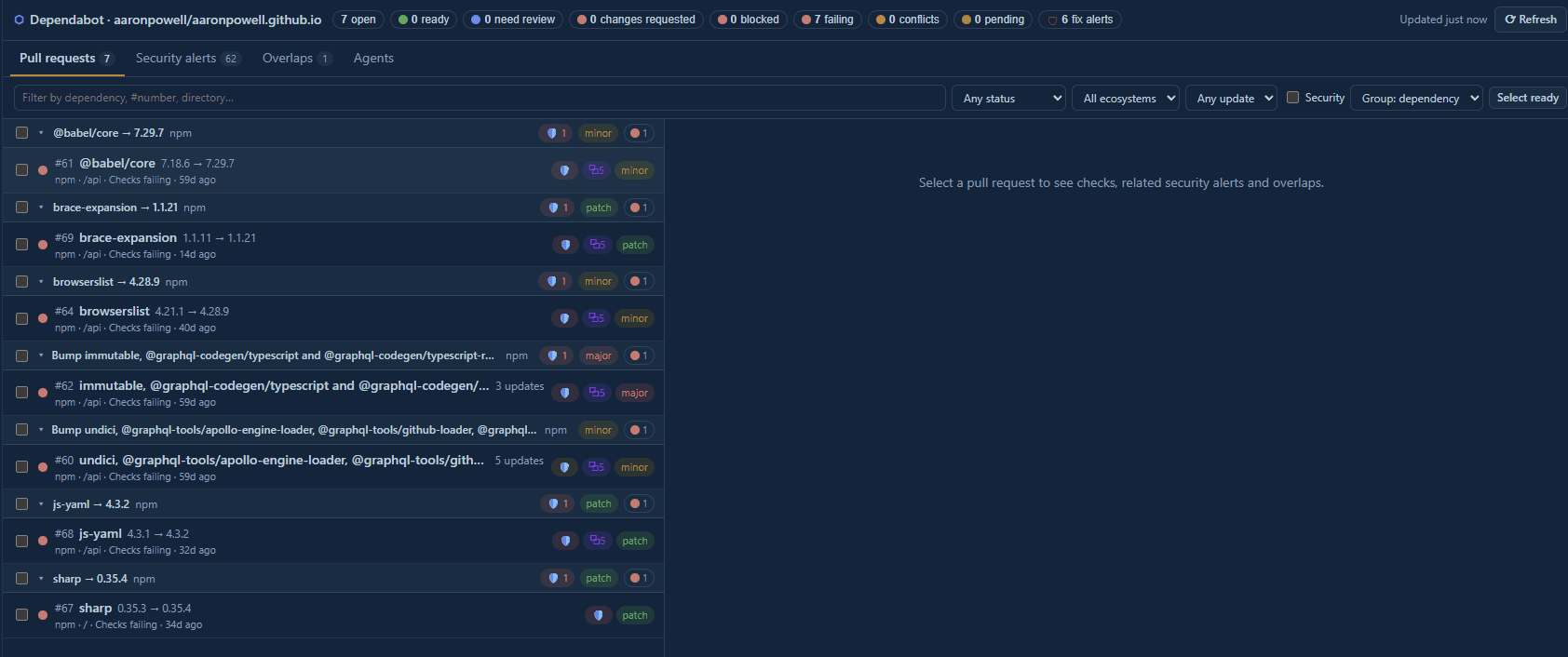
Rather than listing PRs in the order they were opened, the canvas groups them. By default the grouping is by dependency, but you can also group by directory, ecosystem or status. Each PR shows the dependency update (including whether it’s a patch, minor or major version bump), the state of its checks (is CI passing), whether it’s mergeable, and its review state.
To make this concrete, I opened the canvas against this blog’s repository while writing this post. It found 7 open Dependabot PRs, all in the npm ecosystem, and 6 of them are linked to security alerts. They include a mixture of updates:
brace-expansion1.1.11 → 1.1.21 (patch)js-yaml4.3.1 → 4.3.2 (patch)sharp0.35.3 → 0.35.4 (patch)browserslist4.21.1 → 4.28.9 (minor)@babel/core7.18.6 → 7.29.7 (minor)- A PR with several major
@graphql-codegenupdates
It also told me something less pleasant: all 7 PRs have failing checks. Clearly this repository needs a bit of attention! 😅 (The failing checks are to do with deploying PR branches to Azure Static Web Apps, which has been broken for a while, so no biggy 😜)
That’s the sort of thing I wanted the canvas to surface quickly. I don’t need to open each PR to discover that there’s a broader problem worth investigating before I start merging.
Connecting PRs and alerts
The thing that pushed me to build this was the disconnect between Dependabot pull requests and Dependabot security alerts.
The canvas loads open security alerts and matches them against the open PRs. When a PR fixes one or more alerts, you can see that relationship from the PR itself. The alerts view also highlights the alerts that don’t have an open PR addressing them.
For this repository, there are 62 open alerts and 53 of them are not addressed by an open Dependabot PR. Many of those are in the /api project’s package-lock.json, including alerts for packages such as undici, ws, form-data and lodash.
That’s a very different picture to “there are 7 PRs to review”. The PR queue is only part of the work; there’s also a bunch of security work that needs a different approach, such as updating a parent dependency or retiring an old part of the project.
Spotting overlaps
Another thing that the canvas looks for is overlap between PRs.
This is something that we hit a lot in the Community Toolkit. Since it’s a monorepo design, we have a lot of package.json files spread across a lot of folders. If a security alert comes out for one of the packages, we could end up with 50+ PRs updating the same package simultaneously. The canvas helps identify these overlaps, and allows us to combine them into one single PR. Doing this means that we have less merges happening, and fewer CI jobs that need to run when the merge happens to the main branch.
Taking action without giving up control
The canvas isn’t only a read-only dashboard. It supports a number of actions that I’d otherwise perform on GitHub:
- Approve a PR
- Approve and merge a PR, optionally with auto-merge
- Close a PR
- Post supported
@dependabotcommands likerebase,recreateandignore
These can be done one at a time or in bulk. But I was very deliberate about where the guardrails sit.
Approving, merging, closing and commenting only happen after I confirm the action in the canvas. The agent-facing actions can read, filter and select PRs, and they can record results like review verdicts, but they can’t mutate the PRs. Merges also use --match-head-commit, so if a PR has changed since I looked at it, it won’t be merged.
In other words, Copilot can help me understand the queue and get the right PRs selected, but I’m still the one pulling the trigger.
Bringing agents into the workflow
Because the canvas is running inside the Copilot app, it can also hand work off to agents.
Review with agent sends one or more PRs to an agent for review. The agent records a verdict - safe, caution or blocked - along with a summary, and that verdict appears back in the canvas. If the PR’s head changes later, the review is marked as stale so I’m not relying on an old assessment. This can be particularly helpful if there’s a failing CI job, as the agent can help dig through the CI logs to see if the failure is transient or related to the dependency that is being bumped.
The other workflow is what I mentioned above, Combine into one PR. I can select a set of Dependabot PRs and ask an agent to fold them together. The agent works in a separate git worktree, so my checkout isn’t disturbed. It cherry-picks the PRs, regenerates conflicting lockfiles, pushes a new branch and opens a combined PR that lists what it supersedes.
Reviews and combines run in background agents by default, so multiple tasks can be in progress while my main session stays available. The Agents tab shows what’s running, which PRs each agent is working on, and its latest response.
This is where a canvas becomes more interesting than a dashboard. It gives the agent structured context - the PRs, their diffs, the related alerts, and the overlaps - and gives me a structured way to see what the agent did.
Trying it out
The canvas is available as a plugin in the Copilot app:
- Open Customise in the Copilot app and navigate to plugins.
- Search for “Dependabot Triage Canvas” under Awesome Copilot and enable it.
- Ask Copilot to “open the Dependabot triage canvas”.
By default it’ll use the current repository, but you can target a different one by passing { "repo": "owner/name" } when opening the canvas.
You’ll need the GitHub CLI installed and authenticated, as all of the GitHub calls go through gh. Read access is enough for triage, but you’ll need write access to approve, merge, close or comment, and security alert access to see the Dependabot alerts.
Wrapping up
The biggest change for me isn’t any individual button in the canvas. It’s that I can see the shape of the Dependabot work before I start doing it.
Opening it on my blog repo immediately showed me three things: every Dependabot PR is failing checks, most of the open security alerts don’t have a PR, and most of the PRs are going to collide in the same lockfile. That’s a much better starting point than working through PRs one by one.
If you’re dealing with Dependabot queues of your own, give it a try and let me know what you think. The source is on GitHub, and I’d love to hear what other triage workflows would be useful.